Assign
Pick a lesson, practice or homework, set the due date. Quizzes are coming.
A looping demo of New assignment: the teacher picks Lesson 2, then Homework, presses Assign to Section 1-A, and “Assigned to Section 1-A” appears.
For schools and universities
The Islamic Studies books, with practice online. Students read in the Olayn Reader app and practice in the browser. Teachers assign, mark and follow every student.
Pick a lesson, practice or homework, set the due date. Quizzes are coming.
A looping demo of New assignment: the teacher picks Lesson 2, then Homework, presses Assign to Section 1-A, and “Assigned to Section 1-A” appears.
Matching, multiple choice, true or false and fill-in answers mark themselves the moment a student checks.
Tracing, drawing and writing wait in one queue, oldest first.
Every score in one table, a color band per lesson. Arrows and edge shadows show more lessons to the side; a picker hides the ones you do not need.
Coming: add questions to a lesson for your class. Safeguards: a pledge before the first one, the book’s activities can’t be edited, and a report button for students.
The week’s pages, in the Olayn Reader app.

Instant feedback: how many parts are right. A second try after 30 seconds, then the right answers.
A looping demo, sped up, of a matching question her teacher added, on a phone: the student matches three animals to the surahs named after them and presses Check; “Not quite, 1 of 3 right” and a hint appear; during the wait she changes two matches, tries again, and it reads “All right, 3 of 3”.
Scores and the teacher’s comments, as soon as they are saved.

| Kind | Tries | Wait between tries | Score kept | Answers shown | In grades |
|---|---|---|---|---|---|
| Practice | 2 | 30 s | Best | After the last try | As done |
| Homework | 2 | 30 s | Best | After the last try | Yes, due 11:59 pm Manila time |
| Quiz (coming) | 1 | None | The one try | When the teacher releases marks | Yes |
Quizzes are coming: one try, answers shown when the teacher releases them.
Tracing, drawing and writing are scored by the teacher. A teacher can change any score.
Tracing, drawing and writing: the teacher scores them. Any score can be changed.
Book pages open only in the Olayn Reader app, never in the browser. The browser shows the course: assignments, questions, answers and grades.
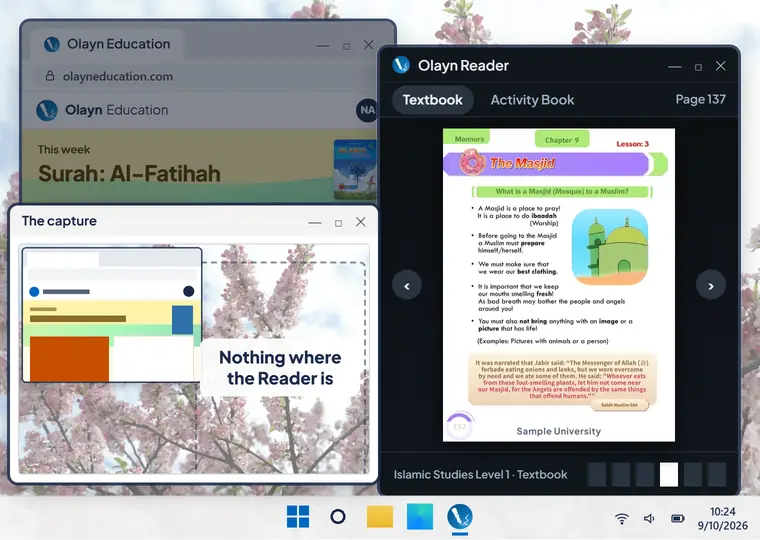
A looping demo on a Windows desktop with a browser and the Olayn Reader open: a screen capture is taken, and the capture shows the browser but nothing where the Reader’s window is.
Windows leaves the Reader’s window out of screenshots, screen recordings and screen sharing. Measured on 18 September 2026.
The path is Android’s FLAG_SECURE setting, under which screenshots and recordings come out black. Claimed once it passes its tests on two phones.
No claim yet.
The Reader turns off copying, printing and saving. Every page carries your school’s mark, and every page opened is recorded against the account that opened it. A leaked copy traces back to the school and its access record, and access can be revoked.
Coming: the school adds its own students and teachers.
A looping demo of joining: a student types the class code RAHMA-BBAQ, then her name, Aisha R., and gets a username and a PIN; and our admin page for Sample University, where a purchase of 50 books gave 50 student seats, goes from 49 to 50 of 50 seats in use, and an alert comes in: Sample University needs more books, 1 student waiting.
A student types the class code and her name, and gets a username and a PIN. Codes leave out letters that look alike (0, O, 1, I, L). A teacher can switch hers off or make a new one.
The school buys from us, and each book gives a seat.
A student in two classes of the same book uses one seat.
Book pages open in the Olayn Reader app.

Voice: ElevenLabs · Photo: Laura Ockel on Unsplash · Illustrations: Irasutoya